iPhone tips: 5 ways to tell your friend where you are

You should always be able to find your friends using iPhones, or at least help them find you. Apple has baked a series of ways you can share your location with others inside of iPhones, so here is everything you need to know.
What can they do with this info?
If the other person is using an Apple system they will receive your location in the form of a small Apple Map. If they tap the Map they will be given directions to get to you.
The fastest way to share location: “I’m at”
No one seems to know this. The fastest way to let someone know where you are on iPhone is to open a Message field up, type their name as recipient, and then in the text entry field write:
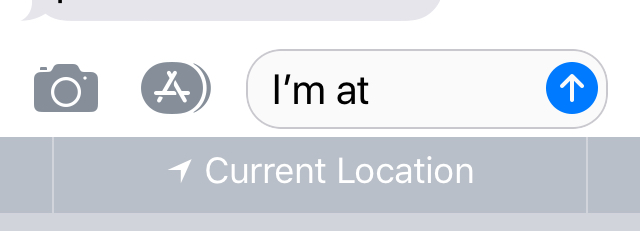
- I’m at
- And hit the space bar after the final ‘t’
- Now look at the predictive text field and you should see the words Current Location.
- Tap these and your iPhone will send your friend a small map with your current location marked upon it. It won’t send the text, so you can delete that after your message is sent.
This is the quickest way to get this done – you can even use Siri for the text.
Share from inside of Maps
- Open Maps and tap the blue dot that shows you where you are
- A new dialog will pop up ‘My Location’. This includes all kinds of information and also includes a big blue Share my Locationbutton, which you should tap
- The Share pane will appear in which you can decide how you want to share the information.
Or just use Force Touch
You can also Force Touch the Maps icon to invoke a Send My Location option. Tap it, you already know the rest.
[amazon_link asins=’B0147B85VS’ template=’ProductCarousel’ store=’9to5ma-20′ marketplace=’US’ link_id=’5ca95131-966a-11e8-b625-95a61131331c’]
Share where you are from a Message
Open a Message thread with the person you want to share your location with and tap the circled ‘I’ you can see at the top right of the window. A new window opens up in which you can choose to Share My Location, or Send my Current Location. The first choice will share location indefinitely or for a day, while the second will just tell the other person exactly where you are at that time. (NB: This will also work from within a Messages thread on Apple Watch).
Or use Find My Friends
You can also choose to share your location with others on a more permanent basis using the Find My Friends app.
- Install the app, open it
- Tap Add at the top right
- Now enter your friend’s name, email or phone number and tap Return
- Tap Send, then choose Share for One Hour, Share Until End of Day, or Share Indefinitely.
Hope this helps!