Hot iPhone? How to use an iPhone on a hot day

U.S. readers may have mixed feelings on news the UK is now enjoying a heat wave, which basically means almost everyone in the country is wandering round with varying amounts of flesh on show. Good times. However, with the hot weather coming, now’s a good time to pick up on how to use an iPhone on a warm day.
Why you need to know this
iPhones, iPads and Macs don’t really like getting too hot. They like to be used in an ambient temperature between 0º and 35º C (32º to 95º F). They get way too warm way too quickly if its any hotter, and bad things happen. What bad things? These:
- They charge slower or may stop recharging at all
- Battery life reduces
- The screen dims or goes black
- Signal strength declines
- The camera flash may stop working
- Your iPhone may become less responsive
- Battery life may become permanently degraded.
- You may even see a warning and the iPhone display will be disabled.
 What is the ‘Temperature: iPhone needs to cool down warning’?
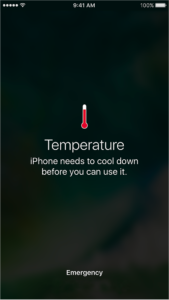 What is the ‘Temperature: iPhone needs to cool down warning’?
If you are using your iPhone to navigate and it gets too hot you may even see a warning message appear on screen before it turns the display off you may see a warning that tells you “Temperature: iPhone needs to cool down”.
Apple is pretty smart – while the display may go dark you’ll still get audible instruction and the display will illuminate a little when you approach a turn, the company explains.
The same alert may appear at other times when the device gets too hot.
You may still be able to make emergency calls if it does, but only if the ‘slide for emergency’ slider is visible.
The 4 laws of hot iPhones
iPhones create their own heat, mostly generated by the processor and battery. What usually happens is that heat is disposed of by the iPhones external chassis – but when the enclosure also becomes hot problems will start.
- Don’t leave your iPhone in direct sunlight
- Don’t leave your iPhone in a parked car
- Definitely don’t recharge your iPhone in direct sunlight – it’s like giving Absinthe to a raving alcoholic
- If your iPhone gets warm to the touch then try to avoid using processor intensive features (AR, games, GPS) until you get the chance to cool the device down.

On Holiday, image c/o Sunny M5/Flickr.
5 tips to keep your iPhone cooler
There are a few other things you can try if you know your device may get too hot and you need to continue using it. These reduce how much heat it creates for itself:
- Remove it from the case
- Keep it out of the sun
- Switch to Low Power Mode (better to use AirPlane mode, but you may need to get a call)
- Switch off Background App Refresh
- Avoid using processor intensive apps (AR, games, music synth, etc).
What to do if your iPhone gets too hot
- Turn the device off
- Disconnect it from the charging cable if you are recharging it
- Take it out of its case
- Remove it from direct sunlight and put it somewhere cooler
- Wait for it to cool down.
- Do not under any circumstances put it in the fridge, a freezer or somewhere much, much colder than the current ambient temperature. Reason: Doing so may cause any moisture to condensate, potentially damaging your iPhone. (Bad news).
Enjoy the summer!