Apple unveils 14+ powerful, amazing accessibility features
Apple has announced a huge selection of accessibility features for its operating systems, many of which will be powered by Apple Intelligence. The new features can also provide a useful hint at system-wide features the company may have planned.
The Apple Intelligence boosted features seem particularly interesting. These include detailed descriptions and natural language navigation in VoiceOver, Magnifier, Voice Control, and Accessibility Reader.
The company also announced new features for controlling power wheelchairs with Apple Vision Pro and generating subtitles across the Apple ecosystem, all coming later this year. And starting today, the Hikawa Grip & Stand for iPhone, an adaptive MagSafe accessory designed with accessibility at the core — is available on the Apple Store online.
What Apple said
“Apple’s approach to accessibility is unlike any other,” said Tim Cook, Apple’s CEO. “Now, with Apple Intelligence, we are bringing powerful new capabilities into our accessibility features while maintaining our foundational commitment to privacy by design.”
“The accessibility features our users rely on every day become even more powerful with Apple Intelligence,” said Sarah Herrlinger, Apple’s senior director of Global Accessibility Policy and Initiatives. “With these updates, we’re bringing new, intuitive options for input, exploration, and personalization, designed to protect users’ privacy at every step.”
VoiceOver and Magnifier
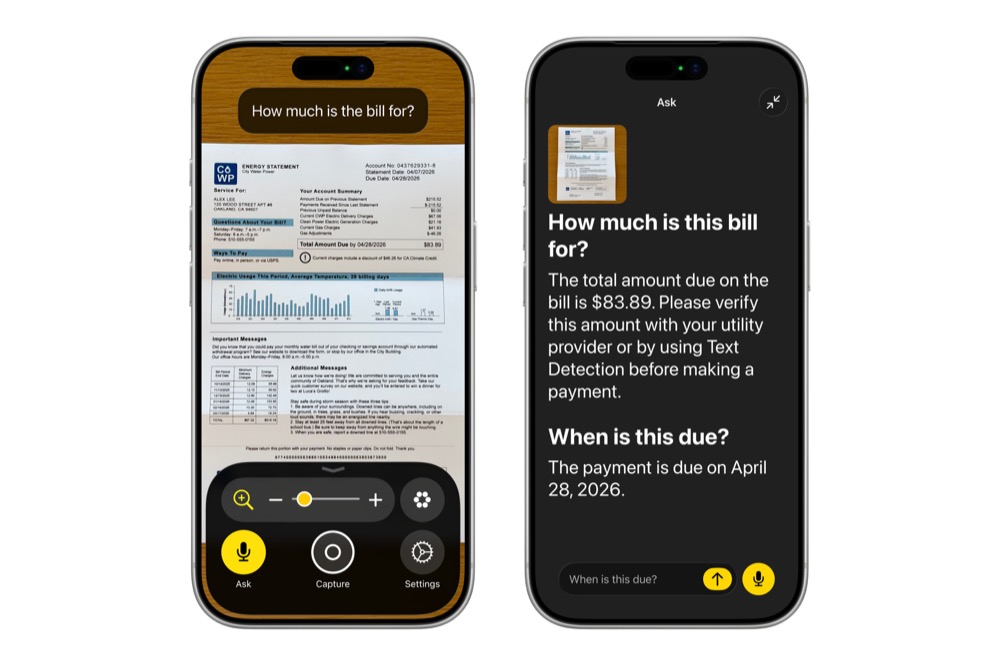
Image Explorer in VoiceOver uses Apple Intelligence to generate detailed descriptions of images held across your system, including images, documents, bills, personal records and more. Accessed via the Action button, VoiceOver users will be able to ask a question about what’s in the camera viewfinder and get a detailed response.
It gets better; users can also ask follow-up questions in their own words to get more visual information. Magnifier also gains spoken word requests, so you can ask it to zoom in, or turn on your flashlight.
Voice Control gets natural
Users can navigate iPhone and iPad using natural, descriptive speech (like “tap the purple folder” or “say what you see”) instead of being forced to memorize exact UI labels or numbers.
Accessibility Reader does a whole lot more
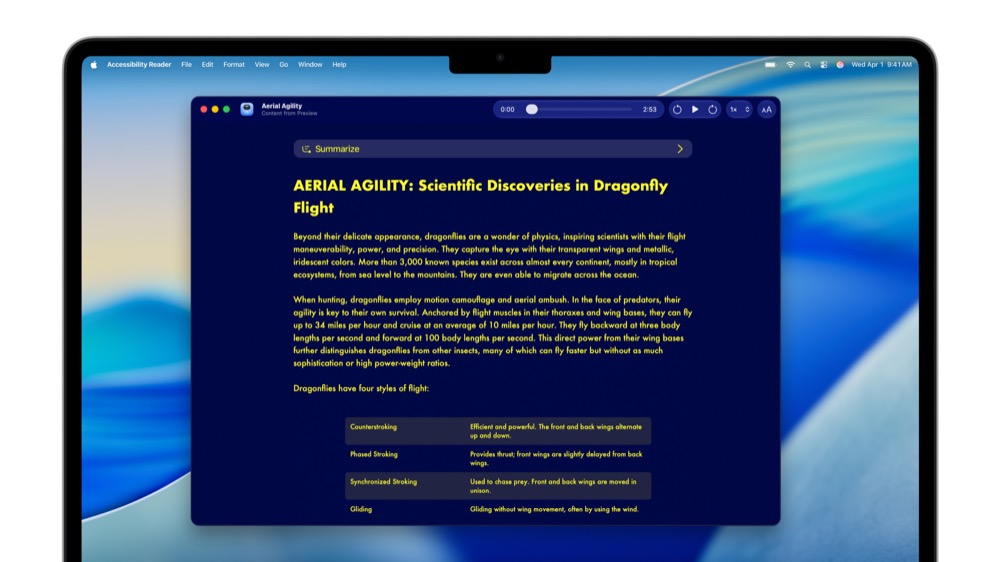
Accessibility Reader improves reading for users with conditions like dyslexia or low vision. It can now handle complex source materials (such as scientific papers with multiple columns, tables, and images), provide on-demand summaries, and translate text while preserving formatting.
Generated Subtitles for Video
This is so smart, it means your Apple device will become capable of generating subtitles form the video you use, so if a family member sends you a clip your device will be able to generate subtitles and transcriptions. With on-device speech recognition, subtitles are generated privately and appear automatically for uncaptioned videos on iPhone, iPad, Mac, Apple TV, and Apple Vision Pro.
You can control wheelchairs with Vision Pro
This makes use of the precision eye-tracking system on Apple Vision Pro. Users with limited physical mobility will be able to control compatible power wheelchairs (launching with systems like Tolt and LUCI in the U.S.) using the precise, calibration-free eye-tracking capabilities of Apple Vision Pro.
“The option to control my power wheelchair on my own is gold to me,” said Pat Dolan, founder of GeoALS and a member of Team Gleason’s patient advisory board, who has lived with ALS for 10 years. “With this new feature, Apple is developing life-enhancing technology for the people who need it most.”
Additional enhancements include:
- Vehicle Motion Cues come to visionOS, which can help reduce motion sickness for people who use Apple Vision Pro as a passenger in a moving vehicle. Vision Pro will also support face gestures for performing taps and system actions, plus a new way to select elements with one’s eyes while using Dwell Control.
- Touch Accommodations provide a new way to personalize setup in iOS and iPadOS.
- Made for iPhone hearing aids pair and hand off between Apple devices more reliably
- Larger Text support is coming to tvOS
- Name Recognition, which can notify users who are deaf or hard of hearing if someone says their name, works across more than 50 languages globally.
- For sign language interpretation app developers, a new API supports users in adding a human interpreter to an ongoing FaceTime video call.
- Those with difficulty interacting with traditional controllers can now connect the Sony Access controller as a game controller with iOS, iPadOS, and macOS.
Most of these software updates are slated to launch later this year, with Apple Intelligence components initially rolling out across a variety of global languages.
You can follow me on social media! Join me on BlueSky, LinkedIn, and Mastodon.