Adobe Photoshop, Express and Acrobat now available free on ChatGPT
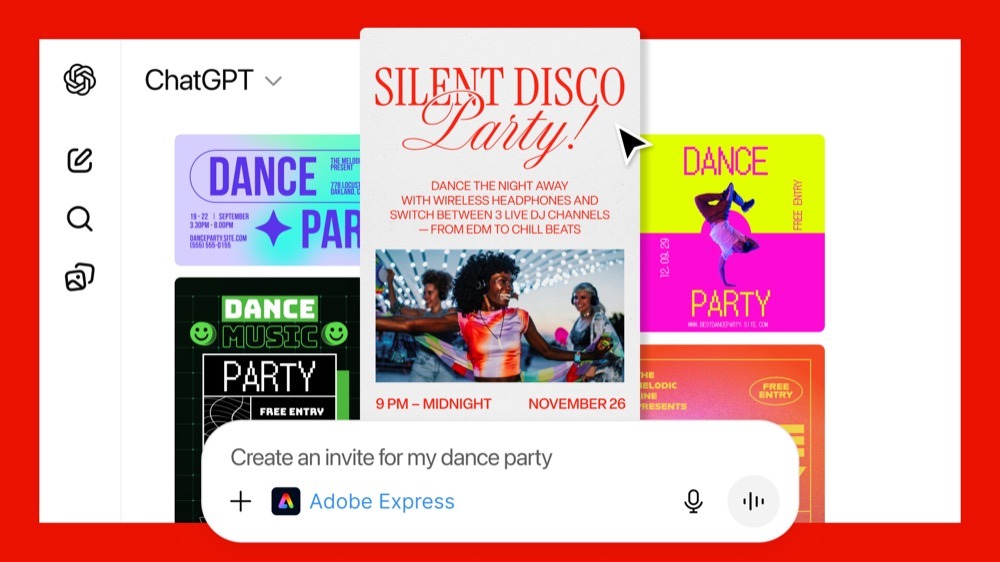
Adobe has made some of the features from three of its products available for free and native use within ChatGPT. It means you can use prompts to do tasks like image editing, animation creation, and manage, merge, extract, or edit text and content from PDFs.
“We’re thrilled to bring Photoshop, Adobe Express and Acrobat directly into ChatGPT, combining our creative innovations with the ease of ChatGPT to make creativity accessible for everyone,” said David Wadhwani, president, digital media, Adobe. “Now hundreds of millions of people can edit with Photoshop simply by using their own words, right inside a platform that’s already part of their day-to-day.”
The apps provide many popular creative features within the chat, including conversational edits or image brightness or contrast adjustments.
How to use Adobe apps in ChatGPT
Accessing Adobe’s apps in ChatGPT is as simple as typing the name of the app followed by an instruction. For example, to blur the background of an image with Photoshop, user can type: “Adobe Photoshop, help me blur the background of this image.” ChatGPT then automatically surfaces the app and uses contextual understanding to guide the user through the action. To learn more about how to get started with Adobe apps for ChatGPT, read here.
The releases build on Adobe’s ongoing innovation in conversational experiences powered by agentic AI and the Model Context Protocol (MCP). Adobe products such as Acrobat Studio promise to transform how we work and Adobe has also introduced AI Assistants for Photoshop and Express.
Pricing and Availability
Photoshop, Adobe Express and Acrobat for ChatGPT are free to ChatGPT users globally and available starting today on ChatGPT desktop, web and iOS. Adobe Express for ChatGPT is also available on Android, with support for Photoshop and Acrobat for ChatGPT on Android coming soon.
Please follow me on Twitter, or join me in the AppleHolic’s bar & grill and Apple Discussions groups on MeWe. Also now on Mastodon.